
Registering an Account
Whether you’re looking to buy a puppy or list your own, you’ll follow the same basic sign-up steps with just a few differences depending on what you’re interested in:
- Individual account (For buyers or one time sellers)
- Seller account (For hobby or professional sellers)
- Stud Service (For listing a stud service)
Create a Breeder (Seller) Account
- Go to www.lancasterpuppies.com
- In the upper-right corner of the homepage, click the user icon to open the Log in or Register screen.
- Before continuing, be aware that by creating an account on Lancaster Puppies, you accept our Terms and Conditions.
- Enter your email address and click “Continue”. This must be an email you have access to.
- We’ll email you a 6-digit verification code (you’ll also see it in the email’s subject line). Enter it to continue. This also confirms your email address, so there’s no separate verification link.
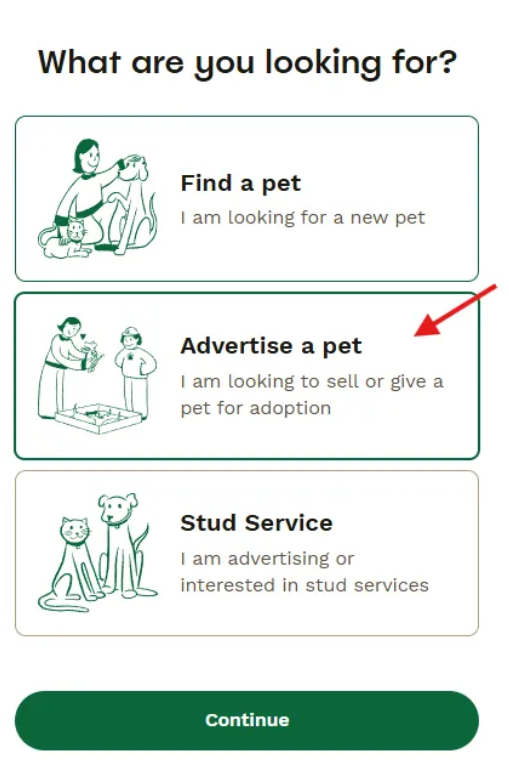
- On the “What are you looking for?” page, select Advertise a pet.
- Then click “Continue”.
- Select a User Type under the “What type of user are you?” header:
– Individual
– Breeder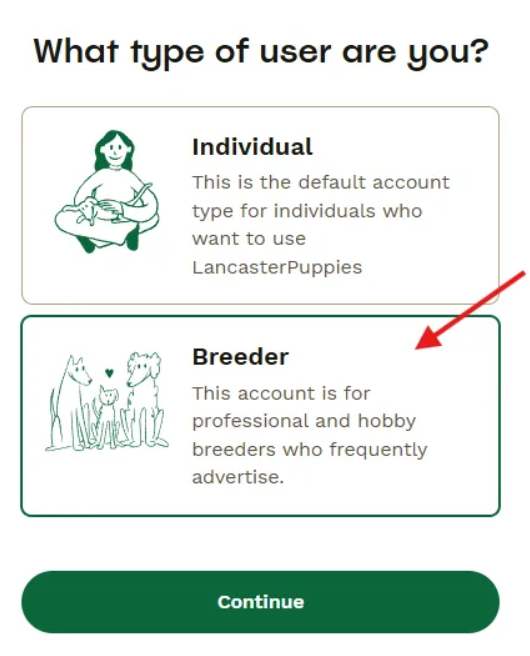
- Fill in your First name and Last name.
- Fill in your Profile Name – this is a great place to add your Kennel name if you have one, or you can repeat your First and Last name again.
- You can choose to subscribe to our newsletter by selecting the checkbox if you would like to stay up to date on the latest news.
- Remember that by creating an account, you accept Lancaster Puppies Terms and Conditions.
- Click “Create my account”.
That’s it, you’re logged in and ready to go! Next time, just enter your email and the new code we send you. See How to Log In to Lancaster Puppies for more help.
Need Help?
We’re here for you! If you run into any issues or have questions, easily send us a support ticket by filling in this Support Ticket form.